Why I Wrote This App

This Lunar Lander app was built to do three things at once: be fun to play, feel physically believable, and help people learn by showing them what really happened during a landing attempt. It is a game first, but it is also a practical demonstration of motion, control, judgement, and improvement through replay.

If you have ever wanted a Lunar Lander game that is more than a quick arcade distraction, this is what I set out to build.

I have read enough, show me the game

Each section below starts collapsed. Use the show / hide (blue) button to show / hide sections.

What This App Is ShowHide

This app is a modern Lunar Lander game inspired by the classic idea of guiding a spacecraft safely down to the moon. The goal is simple to understand and difficult to master: manage thrust, angle, speed, and descent so that you land without crashing.

Under that simple idea is a deeper goal. This is not just a game about pressing keys until you get lucky. It is designed so that you can see what the spacecraft is doing, understand why it behaved that way, and improve your next attempt by learning from the last one.

Why Not Artemis? ShowHide

This app is based on the Apollo 11 Lunar Lander. Yes, we could have based it on the Artemis program lander... but there is a problem with that, we dont yet know what the Artemis program lander will be, or exactly how it will work.

Both SpaceX and Blue Origin have a contract with NASA to provide a lunar lander. One or both of them will fly with Artemis III in about a year, to test it out prior to going to the moon with the Artemis IV mission.

So, for now, this app is based on the Apollo 11 Lunar Lander. As soon as I know more about the Artemis program lander I will add an option to have either lander in the game.

A Short History of Lunar Lander ShowHide

Lunar Lander is one of the oldest and most influential ideas in computer gaming. It began as a simple challenge: can you manage fuel, gravity, speed, and judgement well enough to land safely? That basic idea has proved strong moving across generations of hardware, from simple text based systems, to pocket calculators, to vector graphics terminals, to arcade machines, home computers, and now, here on the web.

The understanding is that the first Lunar Lander Game was written in the programming language FOCAL by a Lexington MA High School student Jim Storer back in 1969. Running on a PDP-8.

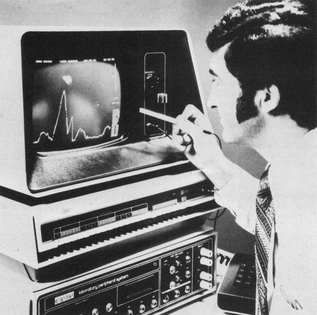
In the early 1970's, DEC introduced a new graphics terminal, the GT40. This was a serious bit of kit, with a 1024 by 768 display (even if today we would casually call that low resolution).

DEC GT40 graphics terminal running Moonlander

DEC wanted to show off what their new machine could do, the GT40 needed a program to show off its abilities, the moon lander game was perfect for this.

A system like that was expensive, advanced, and visually impressive for its time. When people saw a machine like that running an interactive moon landing simulation, it did more than entertain them. It helped to sell them on what computing could become and it sold a lot of kit.

One of the next impressive steps in that journey was the programmable calculator era. The HP-67 Programmable Calculator, introduced in 1976, brought the idea of a playable Lunar Lander style challenge to something you could hold in your hand. The calculator shipped with a version of Lunar Lander in the standard set of programs (see page 14-01 of the manual). Many later HP calculators continued that tradition.

Seen from today, it is easy to underestimate how remarkable that was. These were not toys. They were serious programmable machines, and yet people were already using them to explore simulation, gameplay, and the pleasure of mastering complex landings.

If you want to see one of the first Moon Lander Games, have a look at pages 182 to 187 of DEC's Basic Computer Games book first printed in July 1973.

Games like this helped sell a lot of systems. A good demonstration program does that. It takes abstract hardware capability and turns it into something immediate, visible, and memorable. People may not remember the model number, the processor, or the memory size, but they remember the experience of trying to land on the moon.

Greg's History of Lunar Lander ShowHide
Greg In The 1970s
Greg In The 1970s

For me, this history is not abstract. I can still remember seeing early simulation programs when I was being shown around the university computer room in the early 1970s by Bob Gordon, a good friend of my father. That left a real impression. A decade later, I was working for DEC myself, which makes that part of the story feel even more personal. There is a pleasing symmetry in that: first seeing the magic as a young visitor, and later becoming part of the broader computing world that helped create such machines.

Some versions of Moonlander also picked up a sense of humour. There are famous references to a McDonald’s-style hamburger shop on the moon, which tells you something important about computer programmer culture. Even when the hardware was expensive and the software was technically ambitious, the people building these systems still wanted delight, surprise, and have a joke shared with the users.

That long history is part of why I wanted to build this app. Lunar Lander is not just a game app. It is a thread running through the history of computing itself: simulation, graphics, interaction, education, challenge, and fun, all tied together in one deceptively simple idea.

I clearly recall in the late 1970's working on my HP-67 calculator with a very poor understanding of programming or orbital mechanics, trying to get an orbit simulator working. Then, a few years later, just because I could, I handed in an orbit simulator assignment at University (written in COBOL, as I recall, for some reason, I did not get good marks for that, I have no idea why).

Why I Built It ShowHide

I am a nerd and a space nerd at that, call me a space cadet if you like... I wrote this app because late one night, when I should have been sleeping, I had the radio on, they were talking about the NASA Artemis program returning people to the moon soon.

This reminded me of all the lunar lander programs I have touched and programmed over the years. An idea popped into my head, many people would never have seen the classic 1970’s moon lander games. I rolled over and said to myself don’t be silly, and immediately got up and started working on it, by the time I was back in bed at about 5am I had an initial working prototype. After much more work, I have something I am willing to share.

My expectation is that on about the 3rd or 4th attempt, some people will be able to have a survivable landing, then the challenge is to improve the landings (as shown by higher scores). In a later version, I will have a rankings website, so that people can share with their friends how well they have done. Please give it a go, it needs a large desktop monitor tell me what you think of it.

I wanted a Lunar Lander game that respected the original spirit of the idea, while taking advantage of what modern software can do.

Many games are fun but shallow, or technically accurate but not enjoyable. I wanted something in the middle: a game that people would actually want to play, but one that also makes visible sense and rewards skill, judgement, and practice.

I also wanted a program that could explain itself. When a landing goes wrong, the game should not leave the player guessing.
It should help answer the real questions:

  • Were you descending too fast?
  • Was your sideways motion too high?
  • Did you rotate too late?
  • Did you burn too much fuel too soon?

This app is my attempt to bring these ideas together in one place. Yes, it is still a work in progress!

Game Goals: Fun, Correct, and Educational ShowHide
1. Fun first

The first duty of a game is to be enjoyable. You must be able to win. You must be able to improve. You must feel that your decisions matter. A good Lunar Lander game should make a successful landing feel earned, and a failed landing feel like something you can learn from, rather than a random punishment.

Fun also means giving players reasons to come back. That includes comparing your current performance with earlier attempts, chasing a better landing, managing fuel more intelligently, and eventually comparing your results with friends or a wider community.

2. Correct enough to be believable

This game is designed to show visible physics that make sense. It does not need to become a full engineering simulator, but it does need to behave in a way that looks and feels valid to the player.

That means thrust should move the spacecraft in understandable ways. Rotation should matter. Vertical and horizontal motion should both matter. A gentle controlled landing should look different from a desperate last-second rescue.

In other words, the physics engine serves the game. It should be correct enough to teach, but never so heavy that it stops being enjoyable.

3. Educational through replay and explanation

This game is also meant to be a teaching tool. People learn well when they are engaged, and games create exactly that kind of attention.

A landing attempt should be something you can review. The player should be able to replay what happened, slow it down, inspect the numbers, and see where control was lost or gained. That turns each game into a lesson without making the experience feel like homework.

The key idea is simple: we learn best in moments of interest and enjoyment. So this must remain a game first, with education built into the experience rather than forced on top of it.

Who This Game Is For ShowHide

This game is for several kinds of players. It is for people who remember the classic Lunar Lander idea. It is for students who want a hands-on feel for motion and control. It is for technically curious players who like seeing the numbers behind what is happening. And it is for anyone who enjoys the challenge of mastering a difficult landing.

You do not need to be a scientist or engineer to enjoy it. But if you are interested in physics, problem solving, space, retro games, or the connection between simulation and gameplay, there is extra depth here for you.

How It Was Built ShowHide

This app was built as a modern web-based project using Microsoft Blazor and WebAssembly, partly because I wanted the challenge, and partly because I wanted the whole thing to run in the browser in a clean and direct way. What I thought would be fairly straightforward at first turned out to be a very good way to learn a lot more than I expected about Blazor, WASM, browser rendering, user interaction, and how to structure a game so that it stays understandable.

One of the big attractions of Blazor and WebAssembly for this kind of app is that the game logic runs in the user’s browser instead of constantly going back to the server. A game like this can become very computationally expensive very quickly. If every movement, every calculation, every screen update, and every user action has to be handled centrally on the server.
By moving the load from the server to the client:

  • The app becomes more responsive for the player,
  • Reducing server compute and network workload (therefore also hosting costs).
  • At the cost of a larger (slower) initial download.

When you want something like this to be used by a large number of people, this tuning matters.

This was not built in one neat straight line. There were lots of test versions, lots of experiments, many (far too many) dead ends, and lots of refinements. I kept trying ideas, looking at what worked, changing what did not, and then trying again. Some parts were rebuilt several times as I learned more about what the game needed, what the player needed to see, and what made the whole thing feel more natural and more fun.

ChatGPT and Microsoft Copilot both helped along the way. They were useful for discussing designs, generating code, reviewing approaches, suggesting alternatives, and helping me move past the many little roadblocks that come with a project like this. That did not remove the thinking from the job. These are great tools, and used well they make it easier for developers to draft work, explore alternatives, and move through ideas more quickly, then keep the ones that worked and throw away the ones that did not.

One of the most interesting parts of the project has been how much I learned while building it. I started out thinking mainly about a Lunar Lander game. Along the way I found myself learning much more about Blazor component structure, WebAssembly behaviour, browser event handling, graphics, layout, and the practical realities of making an interactive app feel responsive and clear. In that sense, the project has been a learning exercise as well as a game.

From the start, the design question was not just, “Can I make a lander move?” It was, “Can I make a lander game that is fun, understandable, and worth coming back to?” That question has driven the many versions so far, and it is still driving the refinements now.

Written with the view that the best JavaScript is often the JavaScript you did not need to write: just enough JavaScript to do the job, but not so much that it becomes cumbersome.

References ShowHide

I have read enough, show me the game